Investing in US stocks through Groww: A Complete Guide
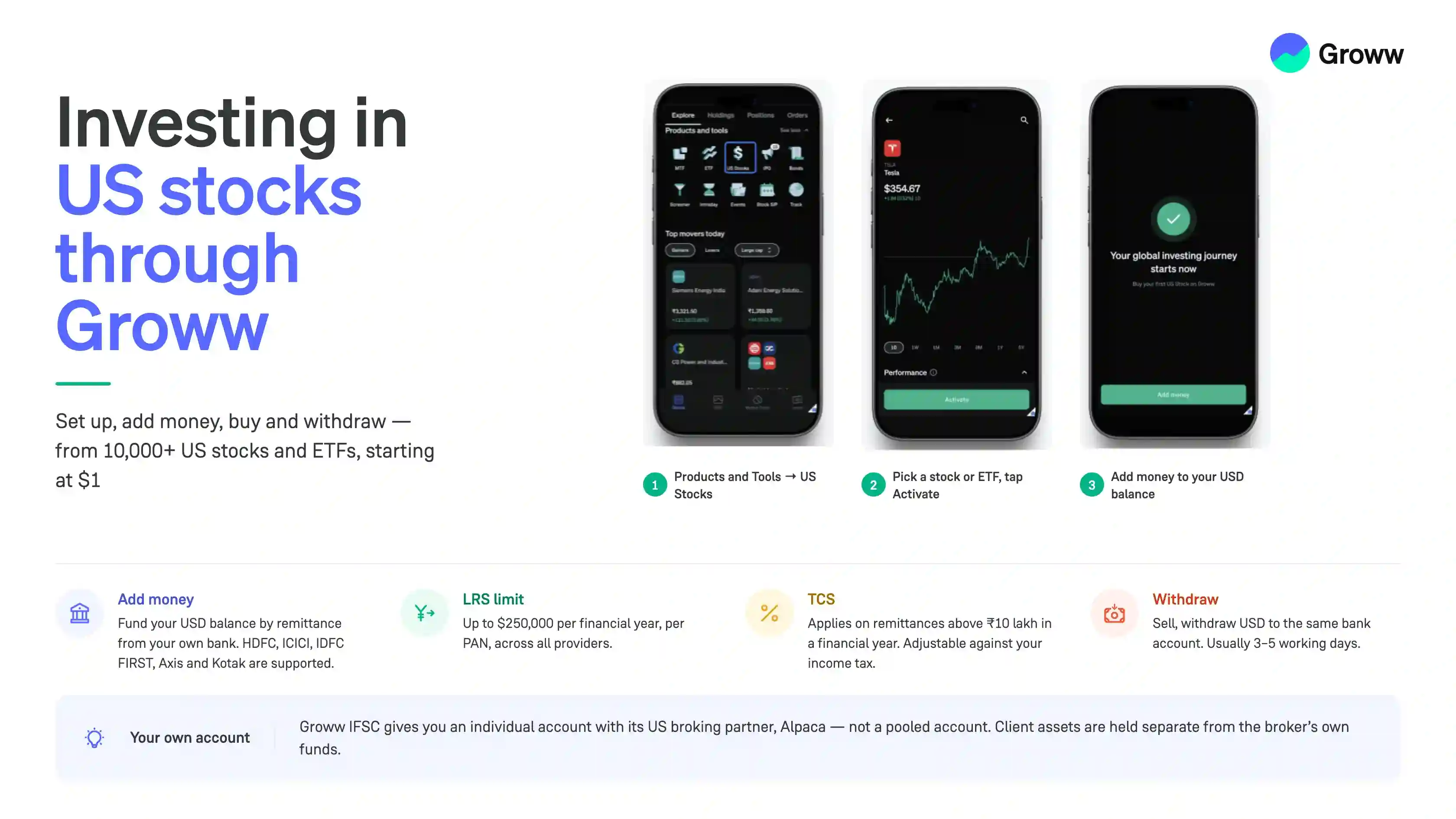


US stocks are live on the Groww app & web!
Indian resident investors can now invest in 10,000+ US-listed stocks and ETFs inside the Groww app with as low as $1 (fractional shares).
This guide walks you through how the service works on Groww, from setting up your account and adding money to buying stocks, tracking your investments, and withdrawing funds.
You’ll also find information on the documents required, supported funding methods, transaction charges, withdrawal timelines, and the tax implications of investing in US stocks from India.
Before you start
How Groww delivers this
Groww lets Indian residents invest in US stocks and ETFs through its GIFT City entity, Groww IFSC, which holds a Global Access Provider licence from the International Financial Services Centres Authority (IFSCA).
Each Groww investor gets their own individual account with our US broking partner (Alpaca) rather than being part of a pooled account. Shares are held electronically in the US market's central depository system, with the investor recorded as the beneficial owner. Under US rules, client assets are kept separate from the broker's own funds.
Investors fund their accounts under the Reserve Bank of India's Liberalised Remittance Scheme (LRS), which allows up to $250,000 a year to be invested overseas. Investors can use the remitted funds to access US stocks on the Groww platform. Tax collected at source (TCS) applies to remittances above ₹10 lakh in a financial year and can be adjusted against the investor's income tax.
How to activate US stocks on Groww
Follow the below onboarding journey to activate US stocks on Groww.
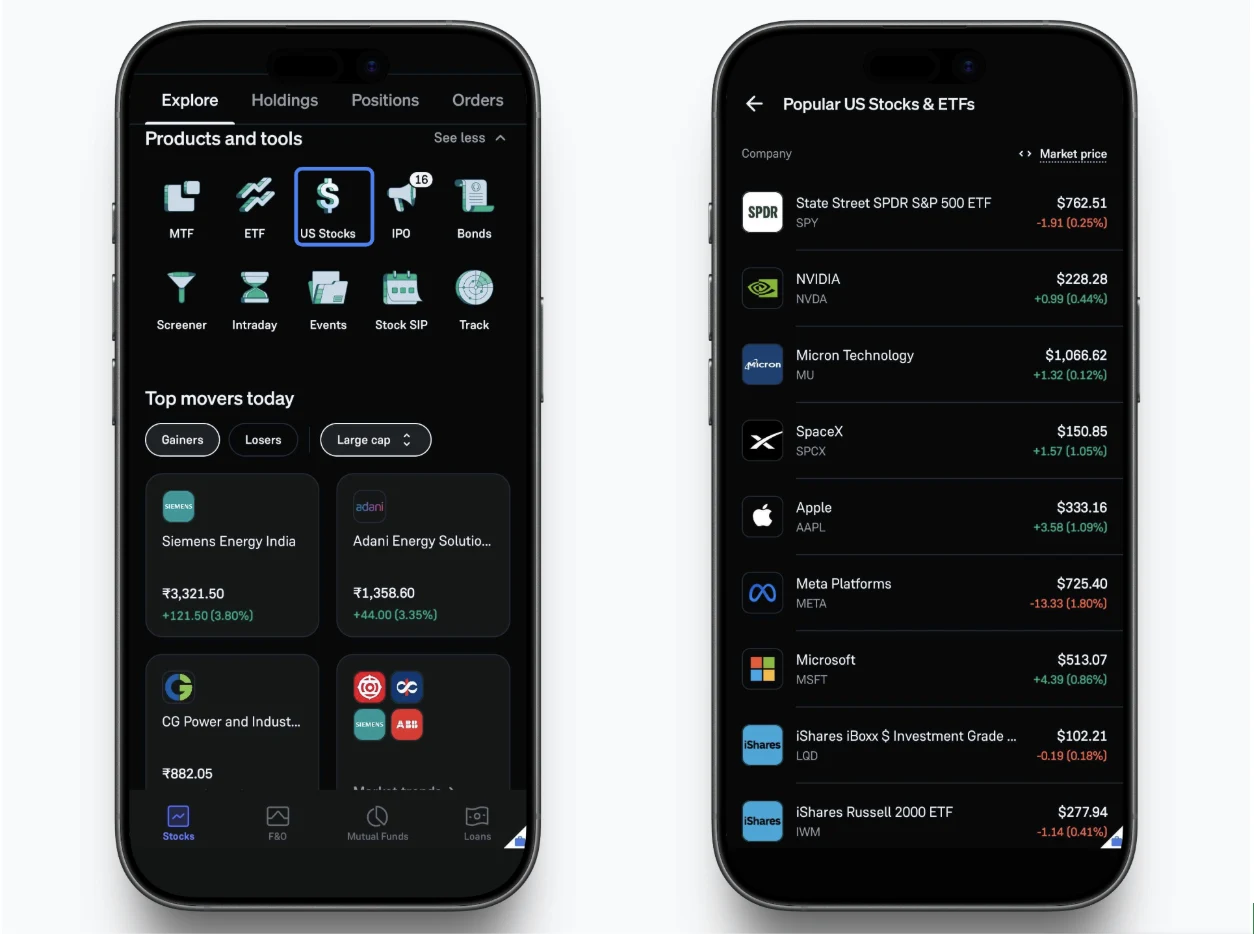
- Look for “US Stocks” under “Products and Tools.”
Open your Groww app, go to “Products and Tools,” and tap on “US Stocks.”
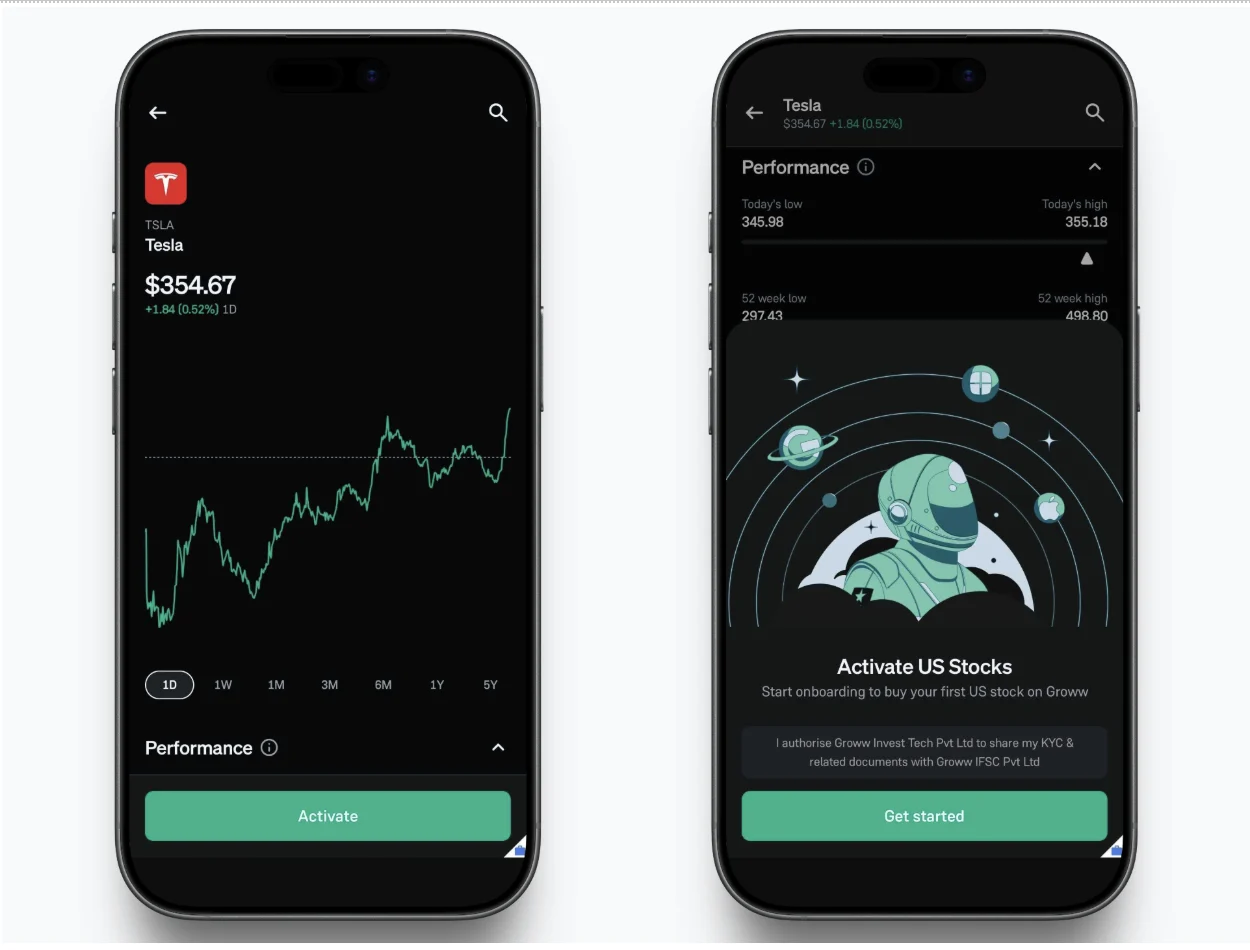
- Select a Stock/ETF & Tap “Activate”
Browse through popular global assets (e.g., Tesla or S&P 500 ETF) and tap Activate to get started.
- Confirm Personal Details
Review your employment status, annual income bracket, liquid net worth, and primary source of funds, then click Continue.
How to invest in US stocks on Groww
- Link Bank & Add Funds
Once the US stock segment is activated, select your preferred Indian savings bank account and fund your global account conveniently via Net Banking. [Detailed procedure to add funds is explained below!]
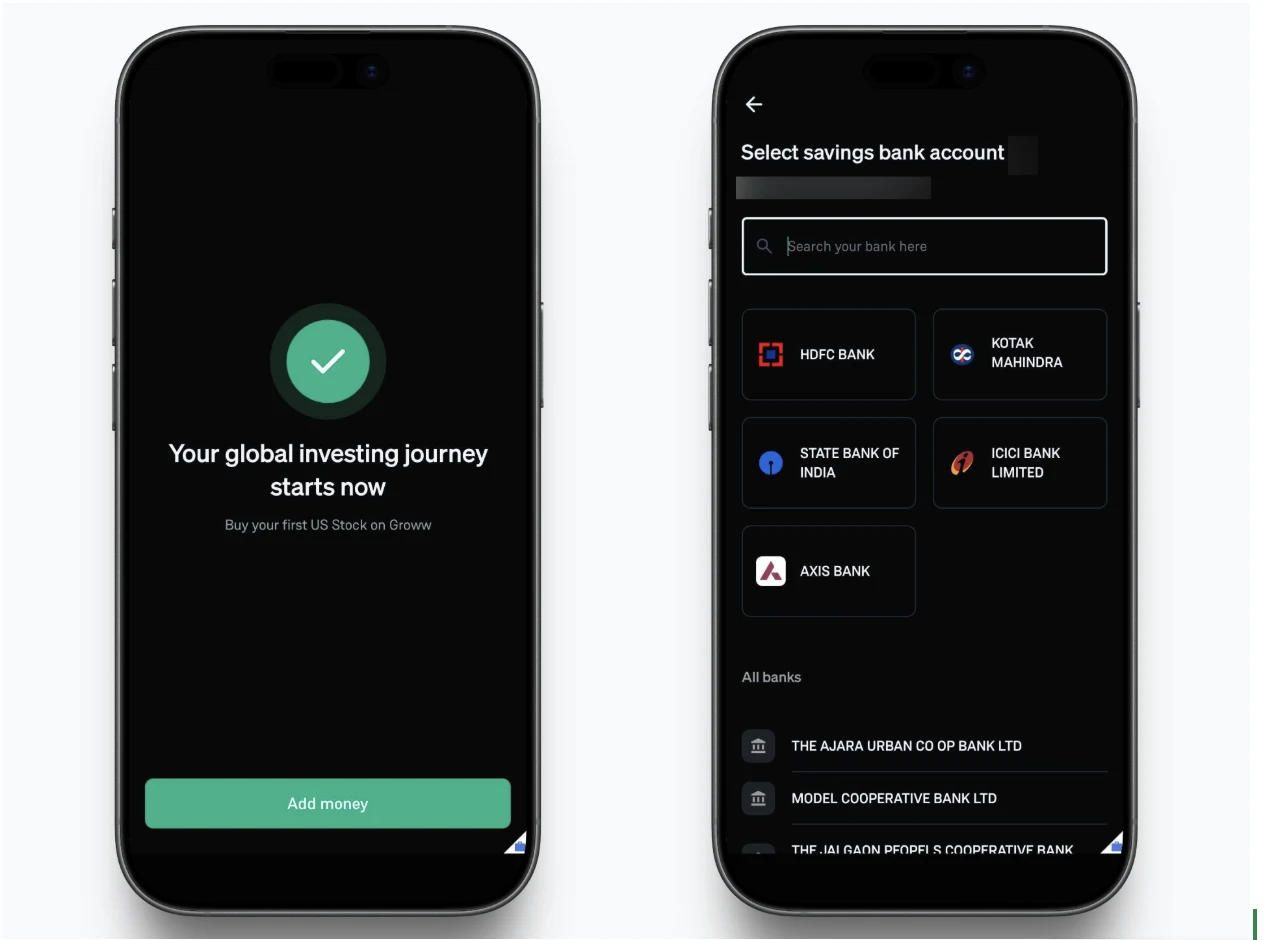
- Start Investing
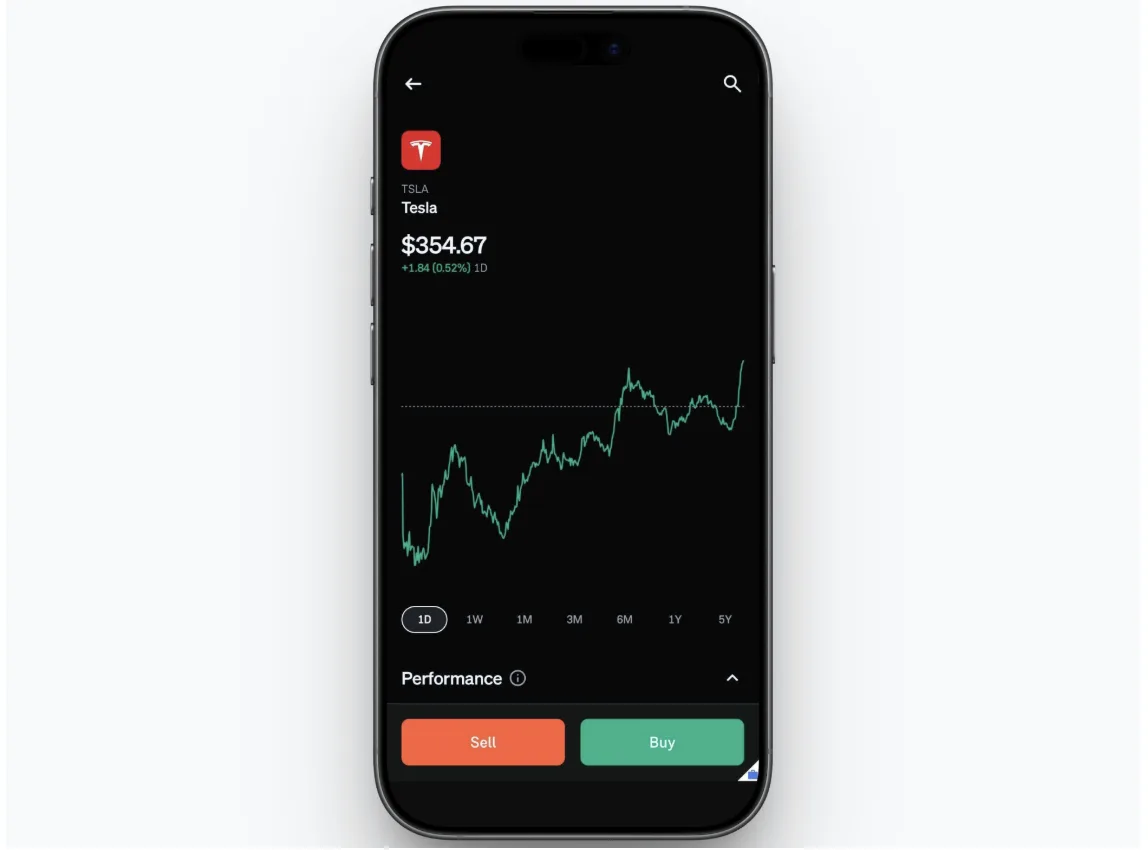
Once funded and the account is live. You can tap Buy or Sell instantly on any supported US stock or ETF and place your order.
Adding Money to Your US Stocks Account
You need an available USD balance to purchase US stocks. Your regular INR Groww balance cannot be used directly for this purpose.
Do note that we are currently supporting the following banks:
- HDFC Bank
- ICICI Bank
- IDFC FIRST Bank
- Axis Bank
- Kotak Mahindra Bank
How do I add money?
You fund your US stock balance with a remittance from your own bank account. We have published walkthroughs for HDFC Bank, Axis Bank, and Kotak Mahindra Bank. Before you begin, keep your bank-linked phone handy and follow the below steps:
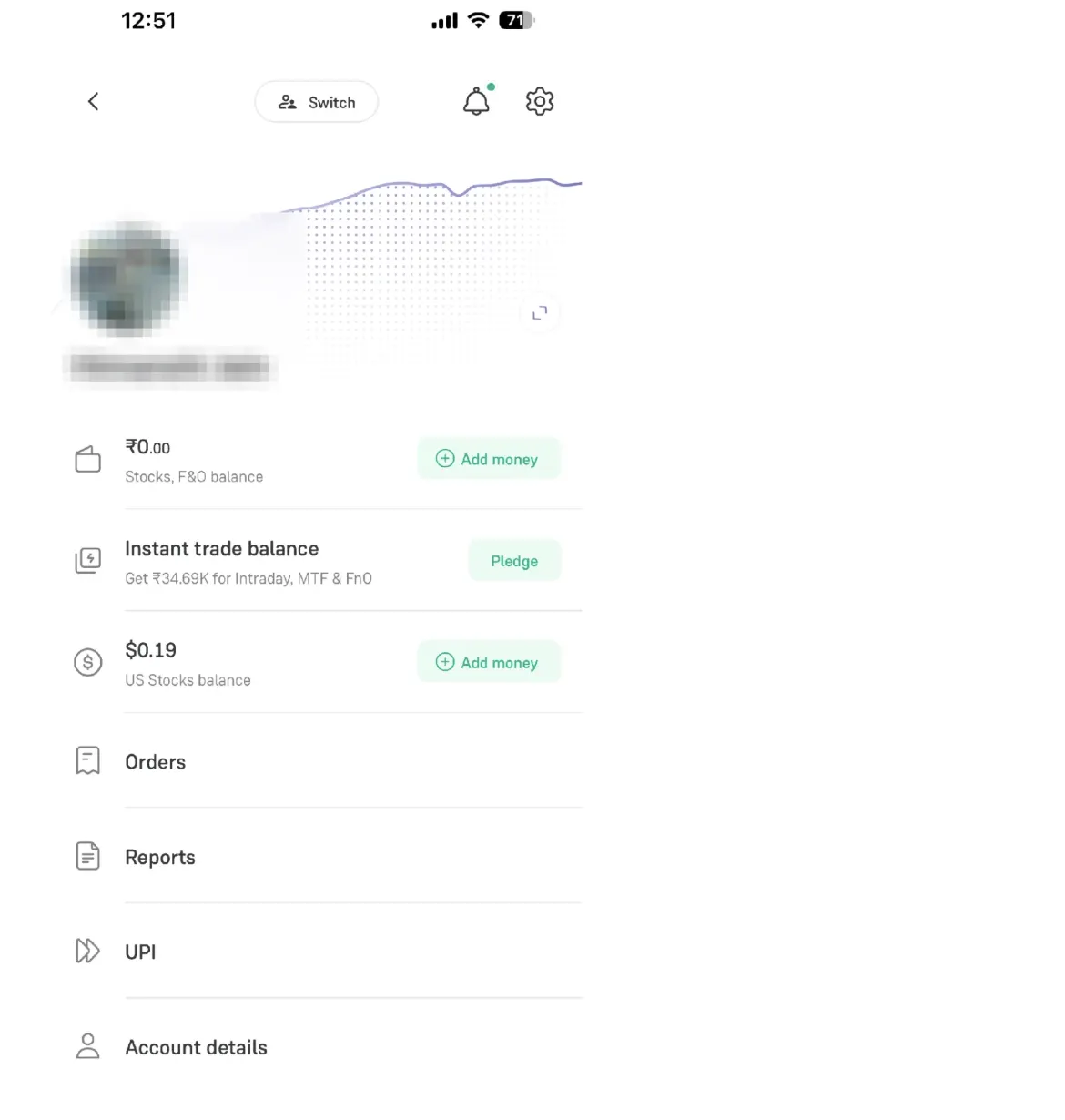
- Open the Profile section of the app and tap “Add money” beside the US stock balance.
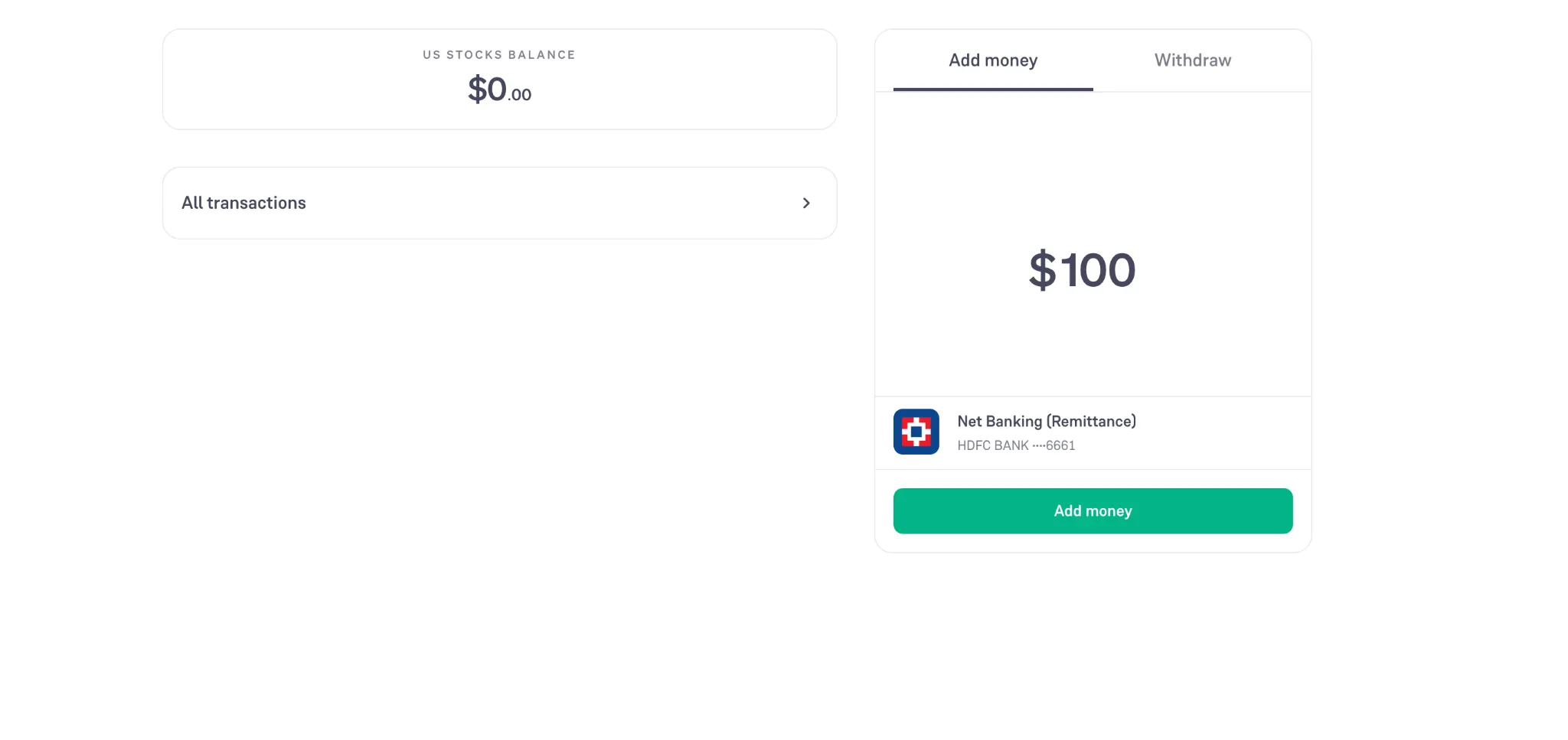
- Enter the amount (minimum $50 for the first deposit and $100 for recurring payments) and select your bank account, which is listed under Net Banking (Remittance).
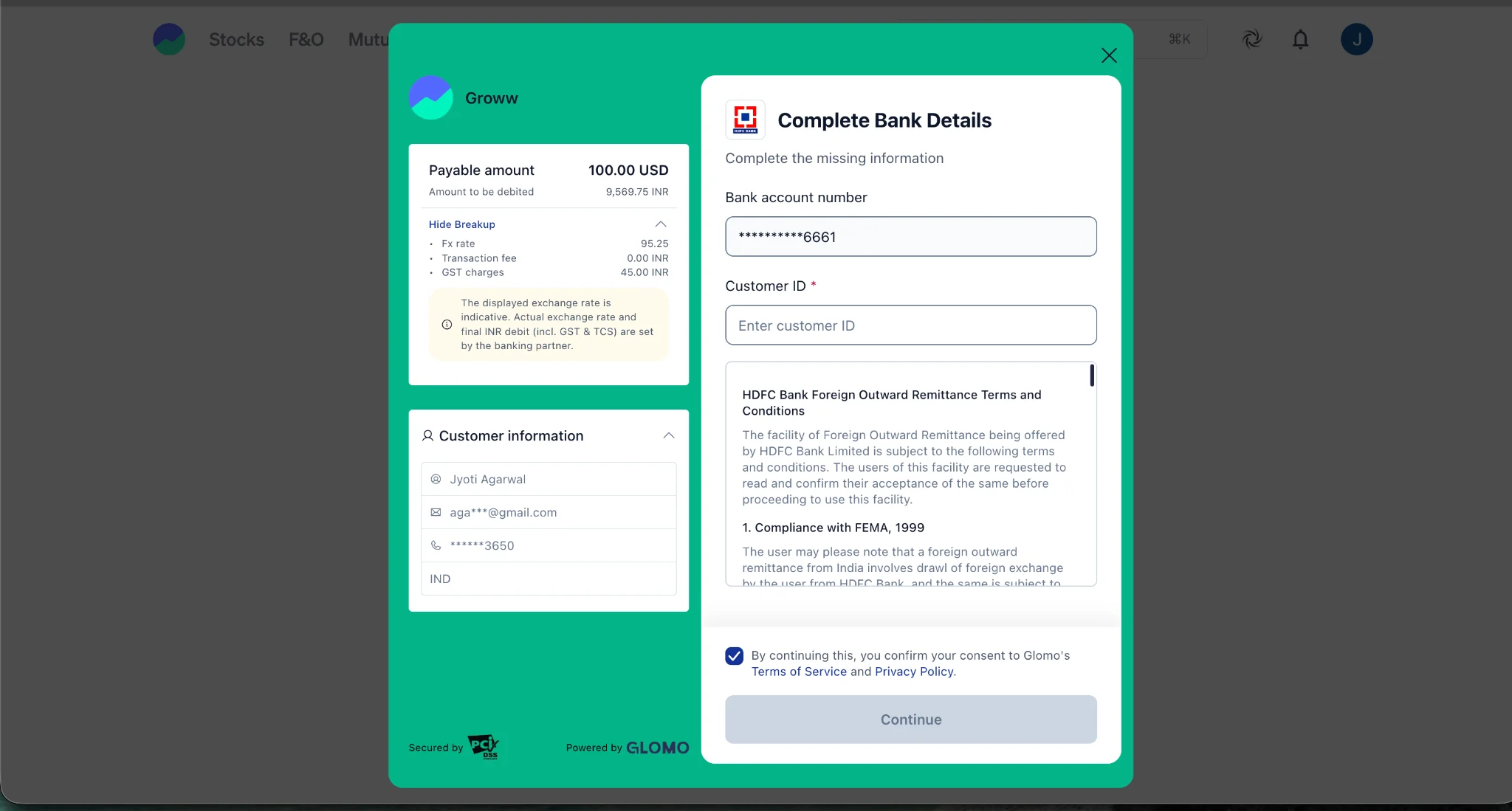
- Enter the customer ID, read the bank’s foreign outward remittance terms, and tick the consent box.
- Click continue and enter the OTP.
- Approve the payment on the bank page.
Withdrawing money from your US Stocks Account
Sale proceeds from US stock deposit in your US stock balance in dollars. You then withdraw to your bank account, and the bank converts them back to rupees.
Follow the below steps to withdraw your available USD balance from your Groww US Stocks account to your Indian bank account.
- Open your Groww account and navigate to the US Stocks section.
- Click on the USD balance section to view the funds available for withdrawal.
- Click on the withdrawal option and enter the USD amount you wish to withdraw.
- Review the details and click Withdraw to submit your request.
- The money will be credited to the same Indian bank account you used to add funds. Withdrawals typically take 3–5 working days.
LRS Limits and TCS on Overseas Remittances
Indian residents investing in US stocks need to understand two important rules:
- Reserve Bank of India's Liberalised Remittance Scheme (LRS), which governs eligible overseas remittances,
- Tax Collected at Source (TCS), which may apply on certain conditions when money is remitted abroad.
What Is the Liberalised Remittance Scheme (LRS)?
The Liberalised Remittance Scheme (LRS) is a framework introduced by the Reserve Bank of India (RBI) under the Foreign Exchange Management Act (FEMA) 1999. It allows resident individuals to remit money abroad for permitted current-account and capital-account transactions, subject to applicable conditions.
Under the RBI's LRS framework:
- Annual limit: An Indian resident can remit up to $250,000 per financial year (1 April to 31 March), per individual, per PAN (Permanent Account Number).
- Who is eligible? It is available to resident individuals, including minors. For a minor's remittance, the prescribed declaration must be countersigned by the natural guardian.
- What counts towards the limit? Eligible remittances for different purposes count towards the same annual limit. The limit is not separately available for each bank or investment platform.
- Can the limit be exceeded? Remittances exceeding $250,000 require prior RBI permission, unless an applicable exception or separate provision permits the remittance.
Does investing in US stocks count towards the LRS limit?
Yes! Remittances made by eligible Indian residents to invest in overseas securities generally fall within the LRS framework.
Suppose you remit $15,000 to fund overseas stock investments and $10,000 for another permitted LRS purpose during the same financial year. Your cumulative remittances would be $25,000.
The remaining LRS limit would be $225,000, assuming you have made no other remittances that count towards the limit.
The limit applies to your eligible remittances across providers, not just the money transferred through Groww.
What Is Tax Collected at Source (TCS)?
Tax Collected at Source (TCS) is an amount deducted by your bank when a transaction falls within the applicable tax provisions. The collected amount is deposited with the government and credited to the remitter's tax records; the same will be reflected in your AIS (Annual Information Statement).
It can be claimed when filing your Income Tax Return (ITR) after adjusting against outstanding tax liability (if any).
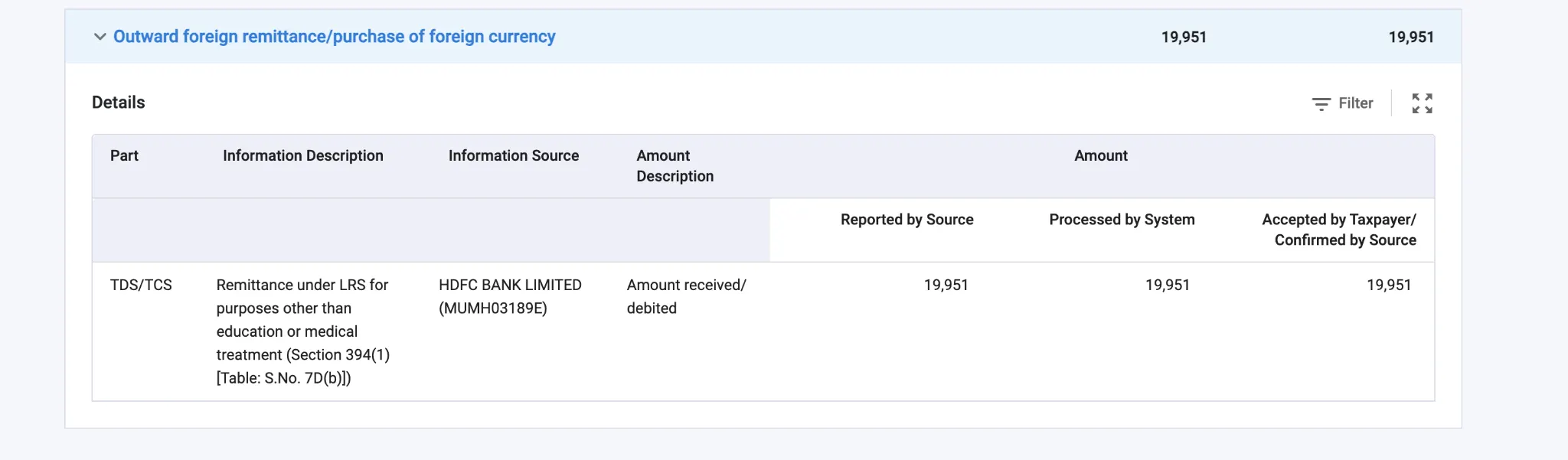
For overseas remittances under LRS, TCS rules depend on the purpose and amount of the remittance.
How Is TCS Calculated on US Stock Investments?
For remittances made for overseas investments, no TCS is deducted if aggregate LRS remittances do not exceed ₹10 lakh during the financial year. Once the threshold is crossed, TCS is charged at 20% on the excess threshold.
The ₹10 lakh threshold applies to aggregate LRS remittances, rather than separately to every transaction or bank. The applicable rules for education, medical treatment, and other remittance categories may differ.
What it costs to trade US stocks on Groww
|
Sell Scenario |
SEC Fee (0.00206%) |
FINRA Fee ($0.000195/share) |
CAT Fee ($0.000003 / share) |
Total Overall Regulatory Fee |
|
Small Trade (Selling 1 share for $150) |
$0.00309 (Rounds to $0.01) |
$0.000195 (Rounds to $0.01) |
$0.000003 (Rounds to $0.01) |
$0.03 |
|
Medium Trade (Selling 50 shares for $2,500) |
$0.0515 (Rounds to $0.06) |
$0.00975 (Rounds to $0.01) |
$0.00015 (Rounds to $0.01) |
$0.08 |
|
Large Trade (Selling 1,000 shares for $50,000) |
$1.03 (No rounding needed) |
$0.195 (Rounds to $0.20) |
$0.003 (Rounds to $0.01) |
$1.24 |
US Stocks Trading
When does the market open?
|
US Standard Time (November to March) |
8:00 PM to 2:30 AM IST |
|
US Daylight Saving Time (March to November) |
7:00 PM to 1:30 AM IST |
Supported US stock order types on Groww
Currently, Groww supports delivery-based market orders and limit orders in US stocks.
- Market-Order: The order is executed at the current market price. However, it does not guarantee execution at the last-traded price. The final price can differ, particularly when the market is volatile or the stock has limited liquidity.
- Limit-Order: A limit order lets you specify the maximum price you are willing to pay when buying or the minimum price you are willing to accept when selling.
For instance, a stock is trading at $100, but you want to buy it only at $95 or less. You place a buy limit order at $95. The order can execute at $95 or lower, but it may remain unfilled if the market price never reaches your limit.
Can I buy fractional shares on Groww?
Yes! You can buy fractional shares on Groww.
For example, if a stock costs $250 and you invest $25, you could purchase 0.1 of a share before applicable charges and execution-price differences.
Dividends and holdings
When a US-listed company pays dividends, US tax is withheld at source before the dividend reaches an eligible Indian investor's account.
Under the India-US Double Taxation Avoidance Agreement (DTAA), the US withholding tax rate on dividends is capped at 25% of the gross dividend for an Indian resident investor.
To claim the applicable treaty rate, the investor needs to provide a valid Form W-8BEN to the relevant withholding agent or financial institution.
If the required documentation is not provided, the default US withholding rate for dividends paid to a nonresident is 30%, unless another exemption or reduced rate applies.
Example: You own 40 shares of a US company that pays a dividend of $0.80 per share.
- Gross dividend: 40 × $0.80 = $32
- US withholding tax at 25%: $8
- Net dividend received: $24
The amount credited to your account may also depend on the brokerage's processing and any applicable charges.
What Is Form W-8BEN?
Form W-8BEN is an IRS tax form used by foreign individuals to certify they are not U.S. citizens or residents so as to claim benefits under an applicable tax treaty.
For an Indian investor, submitting the form helps establish eligibility for the applicable treaty withholding rate on US-source dividends.
US stock taxation in India
Under the India-US Double Taxation Avoidance Agreement (DTAA), capital gains from US stocks are taxed only in India. Dividends are taxed in both countries, and India gives credit for the US tax. However, the treaty does not include the US estate tax.
Capital gains
The holding period decides the tax. US stocks count as long-term after 24 months, unlike the 12 months for Indian-listed shares.
- Sold after more than 24 months: long-term, taxed at 12.5% plus 4% cess, with a surcharge for higher-income brackets.
- Sold within 24 months: short-term, added to your income and taxed at your slab rate.
The ₹1.25 lakh yearly LTCG exemption for Indian equities does not apply here, and there is no indexation. Gains are taxable from the first rupee.
Loses & Advance Tax
Short-term losses can offset short-term and long-term gains. Long-term losses offset only long-term gains. Unused losses carry forward eight assessment years, but only if your ITR is filed by the due date.
If your tax for the year will exceed ₹10,000, pay advance tax: 15% by 15 June, 45% by 15 September, 75% by 15 December, and 100% by 15 March. Late payment attracts penalties u/s 234B and 234C.
Compliance & Tax Filing
Report Foreign Assets in Your Income Tax Return (ITR)
If you qualify as a resident and ordinarily resident (ROR) under Indian income tax rules, you mandatorily need to disclose your US stock holdings in Schedule FA (Foreign Assets) of your ITR. The disclosure requirements depend on your residential status and the applicable tax year.
You may also need to complete:
- Schedule FSI (Foreign Source Income): To report taxable income earned from sources outside India, such as US stock dividends.
- Schedule TR (Tax Relief): If you claim relief for foreign taxes paid, subject to the applicable rules.
ITR-2 or ITR-3 (in case of business income) to report foreign assets.
- Schedule FA: Foreign Assets
In this section, reportable US equity holdings, including initial investment value, peak value, closing value, gross income, and gross proceeds from sales or redemptions, are disclosed.
- Schedule OS: Dividend Income
Dividends received from US companies that are taxable in India need to be included under Income from Other Sources and reported in the relevant part of the ITR, including Schedule OS.
- Schedule CG: Capital Gains from Selling US Stocks
When you sell US shares, calculate the capital gain or loss under the Indian income-tax provisions applicable to the transaction. Report the result in Schedule CG (Capital Gains), where applicable.
-
Schedule FSI: Foreign Source Income
Schedule FSI is used by resident taxpayers to report income accruing or arising from sources outside India. The foreign income should also be reported under the appropriate income head elsewhere in the ITR.
For US stock investments, this can include:
- Dividends: Foreign-source dividend income.
- Capital gains: Gains from selling US shares, where taxable and reportable under the applicable rules.
- Other applicable income: Any other income from a foreign source that must be reported.
-
Schedule AL: Assets and Liabilities, where applicable
Investors' income exceeding ₹1 crore and beyond is required to complete Schedule AL and disclose their year-end wealth and corresponding liabilities.
Claim Foreign Tax Credit (FTC), if eligible.
If tax has been paid or withheld in the US on income that is also taxable in India, you may be eligible to claim a foreign tax credit, subject to the applicable rules and the India–US tax treaty.
You need to file Form 67 and retain supporting documents, such as dividend statements and evidence of US tax withheld. Follow the filing deadline and documentation requirements applicable to the relevant tax year.
US stock holdings
Once executed, your “US Stocks” holdings are tracked in their own view, separate from your Indian stocks, valued in dollars.
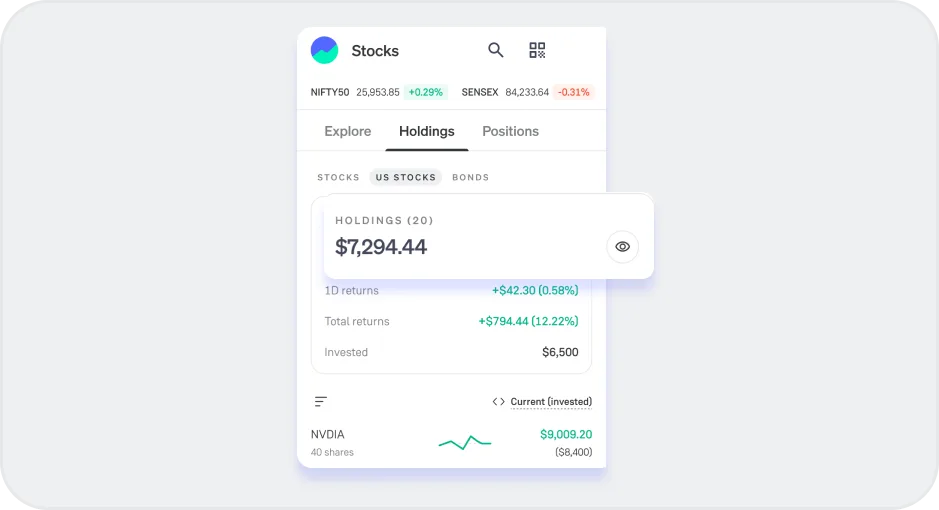
P&L / Download Reports
Profit and loss come in two kinds. Realised P&L is the profit or loss on shares you have sold. Unrealised P&L is the paper gain or loss on shares you still hold, and only realised gains are taxed.
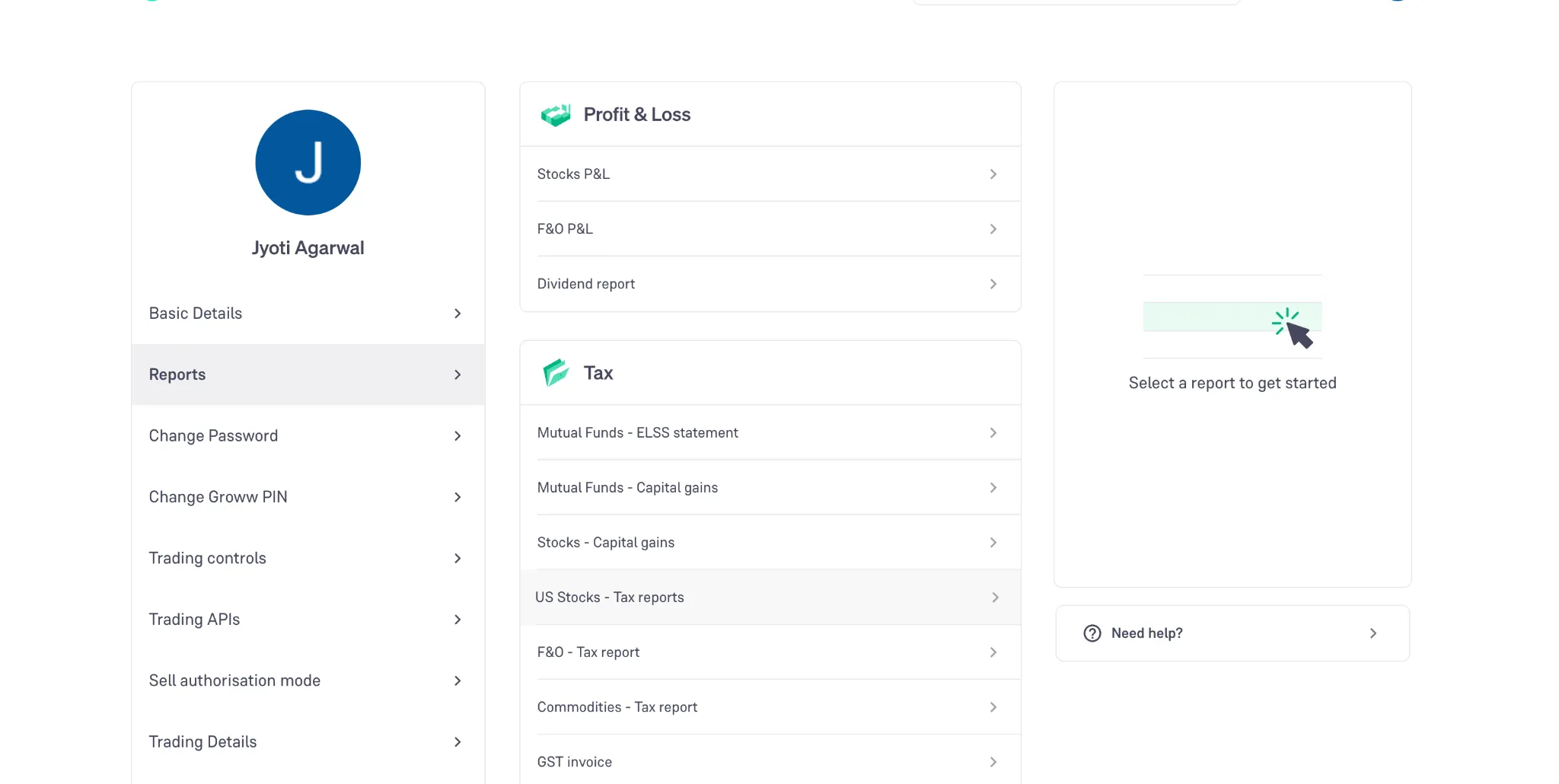
Investors can download the reports under Profile > Reports > Tax > US Stocks - Tax reports.
****** In case of any queries, you can reach out to Groww's US Stocks Help Centre via call, chat support, or email at [email protected]