Types of Orders in US Stocks: Market, Limit & Stop Orders
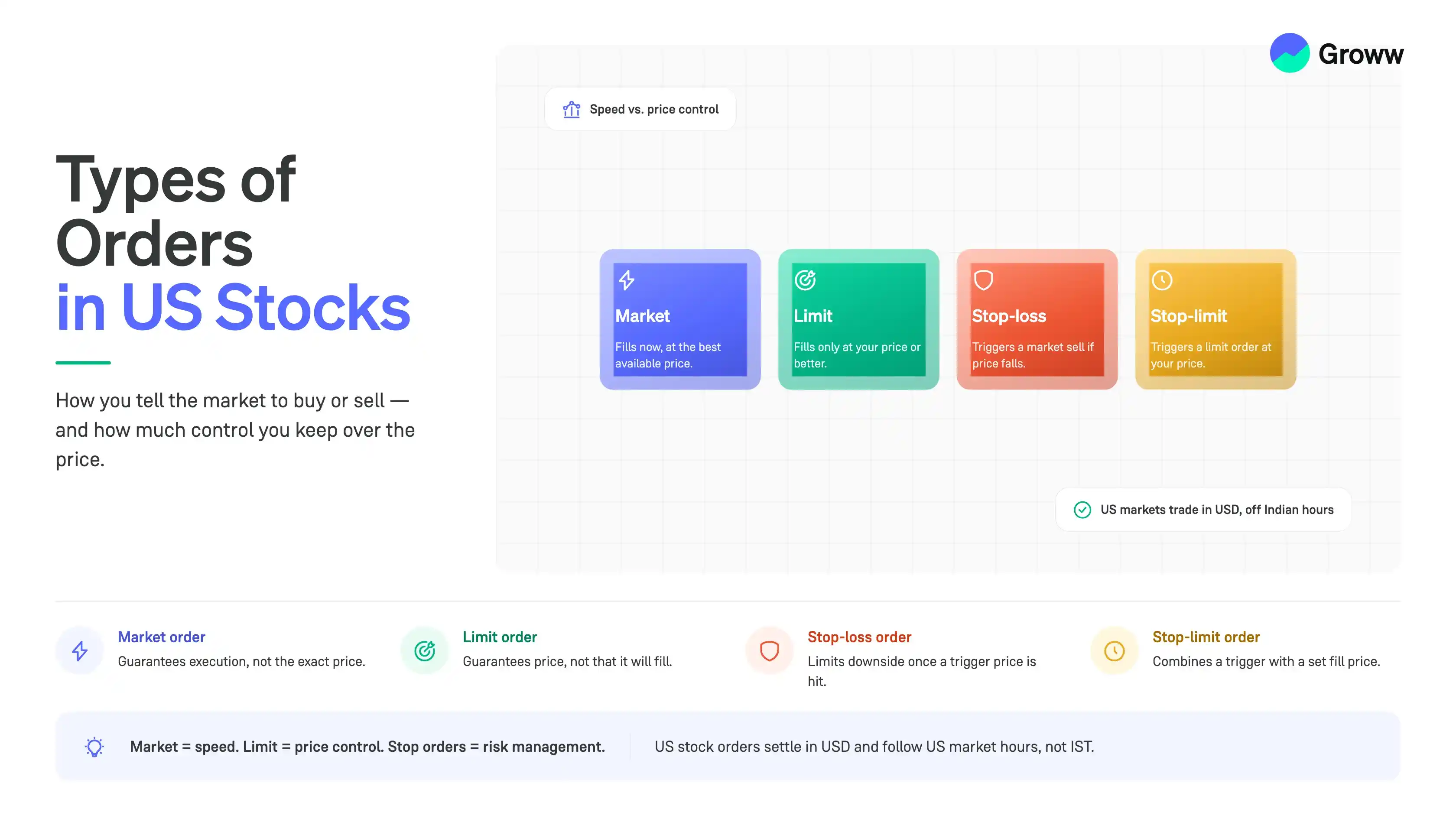


An order type is an instruction you give to a stockbroker to buy or sell a stock in a particular way. It tells the broker how and when your trade should be executed, such as immediately at the current market price or only when the stock reaches a specific price.
The US stock market supports several order types, including market orders, limit orders, stop-loss orders, and stop-limit orders. Each serves a different purpose and helps investors manage trade execution and risk more effectively.
The US stock market includes some of the world's largest stock exchanges, such as the New York Stock Exchange (NYSE) and the Nasdaq, where global companies like Apple, Microsoft, Amazon, NVIDIA, and Tesla are listed.
As more Indian investors diversify their portfolios by investing in US stocks, understanding how trades are executed becomes just as important as selecting the right stocks.
In this article, we will discuss the different types of orders in US stocks, how they work, when to use each one, and the common mistakes investors should avoid while placing orders.
Key Takeaways
- The US stock market offers different order types that help investors buy or sell stocks based on their investment goals, preferred price, and market conditions.
- The four basic order types are market orders, limit orders, stop-loss orders, and stop-limit orders, each serving a different purpose for trade execution and risk management.
- Good Till Cancelled (GTC) orders remain active until they are executed, cancelled, or expire as per the broker's policy.
- Trailing stop orders automatically adjust the stop price as the stock price moves in your favour, helping protect potential gains.
- IOC, FOK, and OCO orders are advanced order types that allow investors to execute trades based on specific conditions, such as immediate execution, full execution, or linked buy and sell orders.
- Understanding different order types and US market trading hours can help Indian investors place trades more confidently and efficiently.
Different Order Types in US Stock Market
The most commonly used order types in the US stock market are:
- Market Order
- Limit Order
- Stop-Loss Order
- Stop-Limit Order
Investors can choose from different order types depending on their investment objectives and market conditions. Let us understand each of them in detail.
Market Orders
A market order is an instruction to buy or sell a stock immediately at the best available market price. Since the order is executed as soon as possible, the final price may differ slightly from the current price that you see while placing the order, especially during periods of high market volatility.
For example, suppose Stock A is trading at around $215 per share. If you place a market order to buy 10 shares, your order will be executed immediately at the best available market price. If the lowest available selling price at that moment is $215.40, your order will be executed at approximately that price.
Limit Orders
A limit order allows you to buy or sell a stock at a specific price set by you. Your order will only get executed if the stock price rises to or falls below the specified price level.
- For a buy limit order, your order will be executed only if the stock price falls to or below your limit price.
- For a sell limit order, your order will be executed only if the stock price rises to or above your limit price.
For example, suppose the shares of Company XYZ are currently trading at $240 per share, but you want to buy it only if the price falls to $235. Therefore, you place a buy limit order at $235.
If the share price drops to $235 or below, your order may be executed. However, if the stock continues trading above $235, the order will remain pending until it expires or is cancelled.
Stop-Loss Orders
A stop order, also known as a stop-loss order, is used to limit potential losses on an investment. Once the stock price reaches the stop price you specify, the stop order is converted into a market order and is executed at the next available market price.
Let's understand this with an example.
Suppose you buy shares of Company ABC at $180. You place a stop-loss order at $165.
Therefore, if the stock price starts falling and reaches $165, your stop-loss order is triggered automatically.
It then gets converted into a market order and is executed at the best available market price. If the stock falls rapidly, the final execution price could be slightly below $165.
Stop-Limit Orders
A stop-limit order combines both a stop order and a limit order. Instead of converting into a market order once the stop price is reached, it converts into a limit order. This allows you to set both a stop price and a limit price, giving you greater control over the price at which your shares are bought or sold.
For example, suppose you bought a company's shares at $730 and want to protect yourself from losses without selling below a certain price.
Hence, you set a stop price of $700 and a limit price of $695.
Now, suppose the stock price falls from $720 to $710, and then to $700.
As soon as the stock reaches $700, your stop-limit order is triggered, and a limit sell order at $695 is placed.
If buyers are available at $695 or above, your order will be executed. However, if the stock price falls sharply below $695 and no buyers are willing to purchase at your limit price, your order may remain unexecuted.
Buy Orders vs Sell Orders
A buy order is placed when you want to purchase shares of a company, whereas a sell order is placed when you want to sell shares that you already own. Both buy and sell orders can be placed using different order types such as market orders, limit orders, stop-loss orders, and stop-limit orders.
|
Basis |
Buy Order |
Sell Order |
|
Purpose |
To purchase shares |
To sell shares you own |
|
Market Order |
Buys immediately at the best available market price |
Sells immediately at the best available market price |
|
Limit Order |
Executes only at the limit price or lower |
Executes only at the limit price or higher |
|
Stop Order |
Commonly used to buy after a breakout above a specified price |
Commonly used as a stop-loss to limit potential losses |
|
Suitable For |
Entering a new investment |
Exiting an investment or booking profits |
Market Order vs Limit Order
Market orders and limit orders are among the most commonly used order types while investing in US stocks. While both of these order types help investors buy or sell shares, they serve different purposes.
|
Basis |
Market Order |
Limit Order |
|
Execution |
Executed immediately |
Executed only at the specified price or better |
|
Price |
Best available market price |
Investor can specify a limit price |
|
Execution Guarantee |
Yes |
Uncertain |
|
Price Certainty |
No |
Yes |
|
Suitable For |
Investors who prioritise quick execution |
Investors who prioritise price control |
What is a GTC (Good Till Cancelled) Order?
A goods till cancelled (GTC) order is an order type which remains active unless it is executed or cancelled by you. Unlike a day order, which expires at the end of the trading session if it is not executed, a GTC order stays open for a longer period, subject to your broker's policies.
GTC orders are useful when you have a specific price in mind, but you don't want to place the same order repeatedly every trading day.
Let's understand this with an example.
Suppose shares of XYZ company are trading at $185 per share, but you want to buy them only if the price falls to $175.
Instead of placing a new limit order every day, you can place a GTC limit order at $175.
The order will remain active until:
- The share price falls to $175, and the order is executed.
- You cancel the order.
- The broker automatically expires the order after its maximum validity period.
Please note: Many US brokers automatically cancel GTC orders after a set period (such as 30, 60, or 90 days). The validity period may vary depending on the broker.
Advanced Order Types in US Stocks
Once you understand the basic order types, you can also explore some advanced order types offered by many US brokers. These order types help you automate trades, manage risk, and execute orders based on specific conditions.
Trailing Stop Order
A trailing stop order is a type of stop order in which the stop price is not fixed. Instead, it automatically adjusts as the stock price moves in your favour. While placing a trailing stop order, you can set the trailing amount as either a fixed dollar value or a percentage of the stock price.
Simply put, the stop price "follows" or "trails" the stock price when it rises, but remains unchanged if the stock price starts falling.
Let's look at an example.
Suppose you buy a stock at $100 and expect its price to rise. To protect your gains, you place a 5% trailing stop order.
This means your stop price will always remain 5% below the highest price the stock reaches.
- When the stock rises to $105, your stop price automatically moves to $99.75.
- If the stock continues to rise to $110, your stop price moves up to $104.50.
Now, suppose the stock price falls from $108 to $106, then to $104.50.
As soon as the stock reaches $104.50, your trailing stop order is triggered, and a sell order is placed at the best available market price.
Immediate or Cancel (IOC) Order
An Immediate or Cancel (IOC) order requires the broker to execute as much of the order as possible immediately. Any portion that cannot be executed is cancelled automatically.
For example, suppose you place an IOC order to buy 100 shares of a stock. If only 70 shares are available at your desired price, those 70 shares are purchased immediately, while the remaining 30 shares are cancelled.
Fill or Kill (FOK) Order
A Fill or Kill (FOK) order is used when you want your entire order to be executed immediately. If the complete order cannot be executed at that moment, the order is cancelled automatically.
Let's look at an example.
Suppose you want to buy 100 shares of a US stock at $50 per share.
When your order reaches the market, only 70 shares are available at your specified price.
Since all 100 shares are not available, your order will not be partially executed. Instead, the entire order will be cancelled automatically.
If all 100 shares are available at your specified price, your order will be executed immediately.
One-Cancels-the-Other (OCO) Order
An OCO order combines two orders. If one order is executed, the other is cancelled automatically.
For example, suppose you own shares of a company trading at $220.
You place:
- A limit sell order at $235 to book profits.
- A stop-loss order at $205 to limit losses.
If the share price reaches $235, the limit order is executed, and the stop-loss order is cancelled.
If the share falls to $205 first, the stop-loss order executes, and the limit order is cancelled.
How Do Different Order Types Work?
Each order type serves a different purpose. Some are used for quick execution, while others provide better control over price and market volatility.
The table below highlights different types of orders in US markets and how they work:
|
Order Type |
Best Used When |
|
Market Order |
You want to buy or sell immediately at the current market price. |
|
Limit Order |
You want to buy or sell only at a specific price or better. |
|
Stop-loss Order |
You want to limit potential losses on an existing investment. |
|
Stop-limit Order |
You want more control over the execution price after the stop price is reached. |
|
GTC Order |
You want your order to remain active until your target price is reached. |
|
Trailing Stop Order |
You want to protect profits as the stock price moves in your favour. |
|
IOC Order |
You want immediate execution, even if only part of the order is filled. |
|
FOK Order |
You want the entire order to be executed immediately or not at all. |
|
OCO Order |
You want to place two linked orders, where executing one automatically cancels the other. |
US Stock Market Trading Hours: What Indian Investors Should Know?
When investing in US stocks, it is important to understand the trading hours of the US stock market. Since the US and India are in different time zones, orders placed by Indian investors may be executed at different times depending on the market session.
The table below shows the US market timings in Indian Standard Time (IST).
|
Trading Session |
Standard Time (IST) |
Daylight Saving Time (IST) |
|
Pre-Market |
2:30 P.M. - 8:00 P.M. |
1:30 P.M. - 7:00 P.M. |
|
Regular Market |
8:00 P.M. - 2:30 A.M. |
7:00 P.M. - 1:30 A.M. |
|
After-Hours |
2:30 A.M. - 6:30 A.M. |
1:30 A.M. - 5:30 A.M. |
EST (Winter): November to March
EDT (Summer): March to November
What Does This Mean For Indian investors?
If you are placing orders from India, it is helpful to know which trading session is active.
- Regular market hours generally have the highest trading activity and liquidity.
- Pre-market and after-hours sessions allow investors to react to company announcements, earnings, and global news released outside regular trading hours.
- However, these extended trading sessions may have lower trading volumes and wider bid-ask spreads, which can lead to greater price fluctuations.
Understanding the different trading sessions can help you decide when to place your orders and what type of order may be more suitable for prevailing market conditions.