Lock F&O Trading: A Kill Switch to Help You Trade More Responsibly
Hello users,
If you are an active trader or just starting your trading journey, we all know that not every trading day goes as planned. Some days, you book profits and call it a day. On others, you may feel tempted to take just one more trade to recover a loss or chase an opportunity.
Successful trading isn't just about finding the right opportunities. It is also about managing risk and knowing when to stop.
To help you manage those moments better, we are introducing Lock F&O Trading (Kill Switch) on Groww. It is a risk management feature that lets you voluntarily lock yourself out of F&O and Commodity trading for the rest of the trading day.
Once activated, the decision cannot be reversed until the next trading day, helping you avoid impulsive trades and giving yourself time to reset.
What is Lock F&O Trading?
Lock F&O Trading, also known as the Kill Switch, is a voluntary risk management feature designed for traders who want greater control over their trading behaviour.
Once enabled:
- F&O and Commodity trading are locked until 11:59 PM on the same trading day.
- You cannot place new orders in these segments.
- The lock cannot be disabled or reversed by the user.
- Stocks and Mutual Funds continue to remain available as usual.
How Lock F&O Trading Works?
Activating the Lock F&O trading (Kill Switch) is simple, but intentionally designed to make you pause before making the decision.
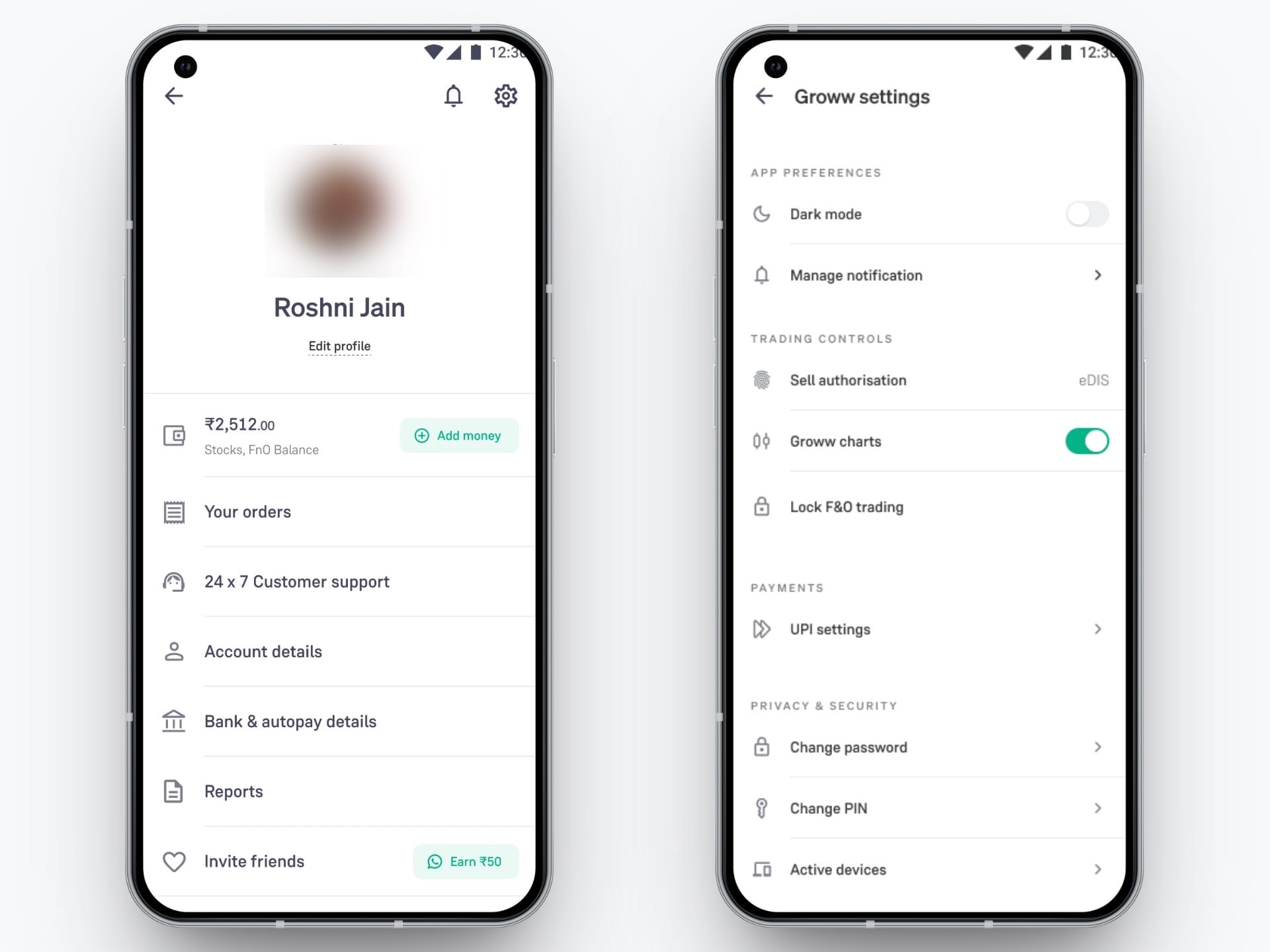
Step 1: Go to Settings
Navigate to:
Profile → Settings → Lock F&O Trading
Step 2: Review the Information
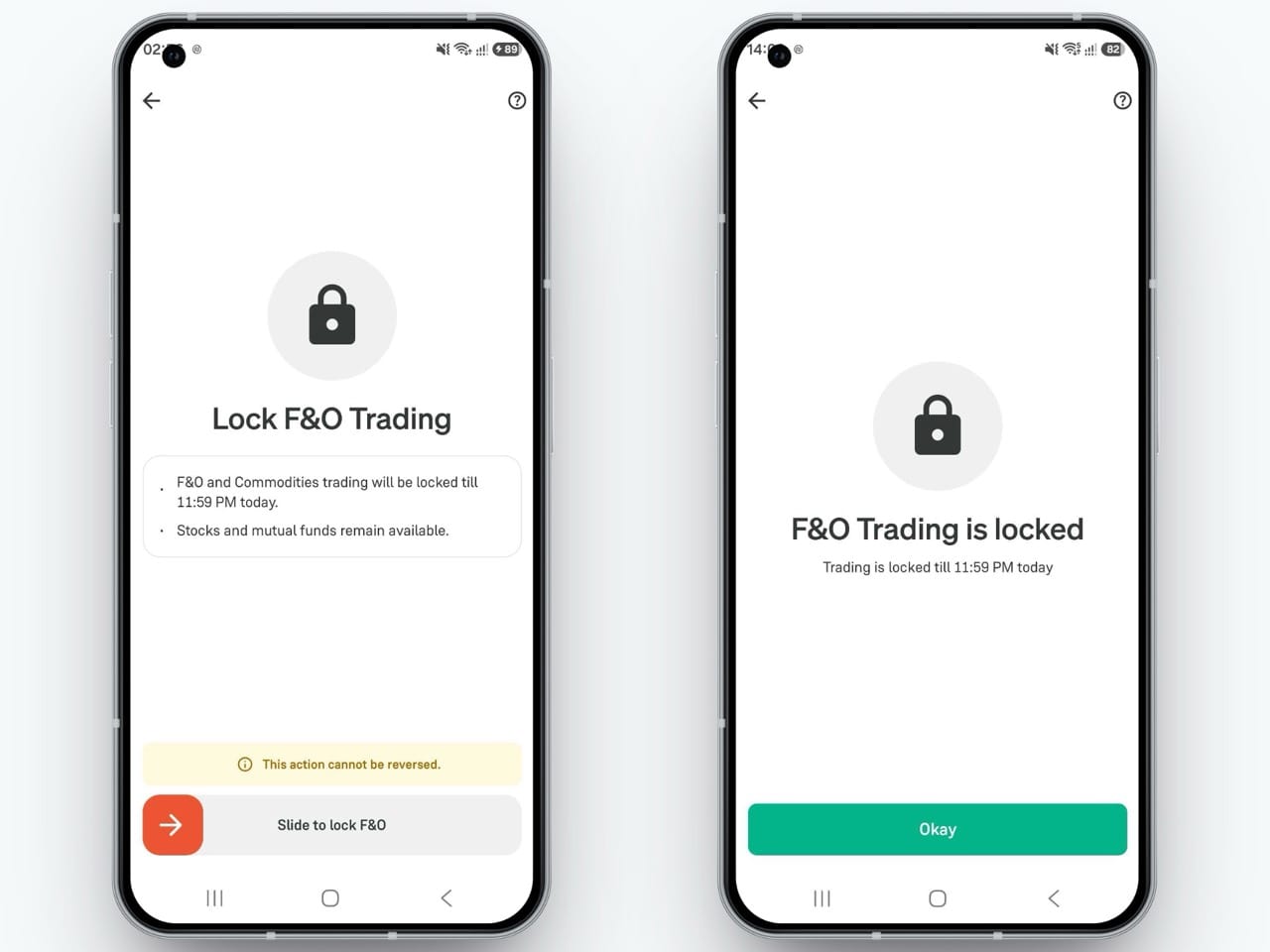
Before activating, Groww clearly informs you that:
- F&O and Commodity trading will remain locked until 11:59 PM today
- Stocks and Mutual Funds will continue to be available
- This action cannot be reversed
Step 3: Slide to Lock
To avoid accidental activation, the feature uses a deliberate Slide to Lock F&O interaction instead of a simple tap.
Once completed, your Lock F&O trading (Kill Switch) is activated immediately.
What Happens After You Activate the Lock?
Once activated:
➡️ F&O and Commodity trading are locked
You cannot place any new orders in these segments until the next trading day.
➡️ Continue Investing in Other Products
Lock F&O Trading only restricts F&O and Commodity trading. You can continue to invest in stocks, mutual funds, ETFs, IPOs and other investment products on Groww as usual.
➡️ Existing Positions Must Be Closed First
If you have active F&O or Commodity positions, the Kill Switch cannot be activated immediately.
You will first need to close all your open positions before you can lock trading for the day.
The system never forcefully squares off your positions.
➡️ View-Only Mode
After activation, you can continue to view your positions, charts, orders and trading history, but you won't be able to initiate new trades in the restricted segments.
Ready to Explore This Feature?
If you ever feel it is time to step away from the markets for the day, Lock F&O Trading is here to help.
Simply head to Profile → Settings → Lock F&O Trading and activate the feature whenever you want to pause F&O and Commodity trading.
Other Updates